Image color picker that reads the exact pixel
A free online image color picker that reads the exact pixel under your cursor. Drop in a photo or paste a screenshot, hover to magnify the pixel grid, and click to copy HEX, RGB and seven more codes. Your image never leaves your device.
Drop an image to pick colors
Or paste with Ctrl + V, browse your files, or load one from a URL. Nothing leaves your device.
Click to save a color · scroll to zoom · space + drag to pan · arrow keys nudge one pixel
The dominant colors in your image, with how much of it each one covers.
Load an image and its palette appears here.
Every color you click is pinned to the image. Rename, reorder or remove them.
No picks yet. Click anywhere on the image to save one.
Schemes built from your current color, rotated in OKLCH so every member keeps the same visual weight.
#6366F1
Pick a color to begin
Accessibility
WCAG 2.1Aaon white
—
—
Aaon black
—
—
Recent
What an image color picker does
An image color picker answers one question: what color is that, exactly? You hand it a picture, point at a spot, and it reads the pixel sitting under your cursor and gives you the code for it.
Most people arrive with a screenshot, a JPEG from a client, or a brand guide saved as a PDF. The color is already in the file as numbers. You just cannot read them by eye.
An online image color picker draws your file on a canvas, reads the pixel values back and turns them into codes you can paste. A good one also lets you widen the sample on grainy photos, gives you more than a hex code, and keeps your file on your computer.
Nothing is uploaded. The tool runs entirely in your browser.
- Takes
- Any image your browser can decode, up to 40 MB
- Gives back
- Nine notations, live, for every pixel
- Palette
- Eight colors, each with its share of the image
- Sample area
- One pixel, or averaged over 3, 5 or 11
Leaves your device
Nothing
Costs
Nothing, and there is no account
What you get after the click
Reading the pixel is the easy part. This tool also gives you shades, contrast checks, color-blindness previews and export files for every color you pick.
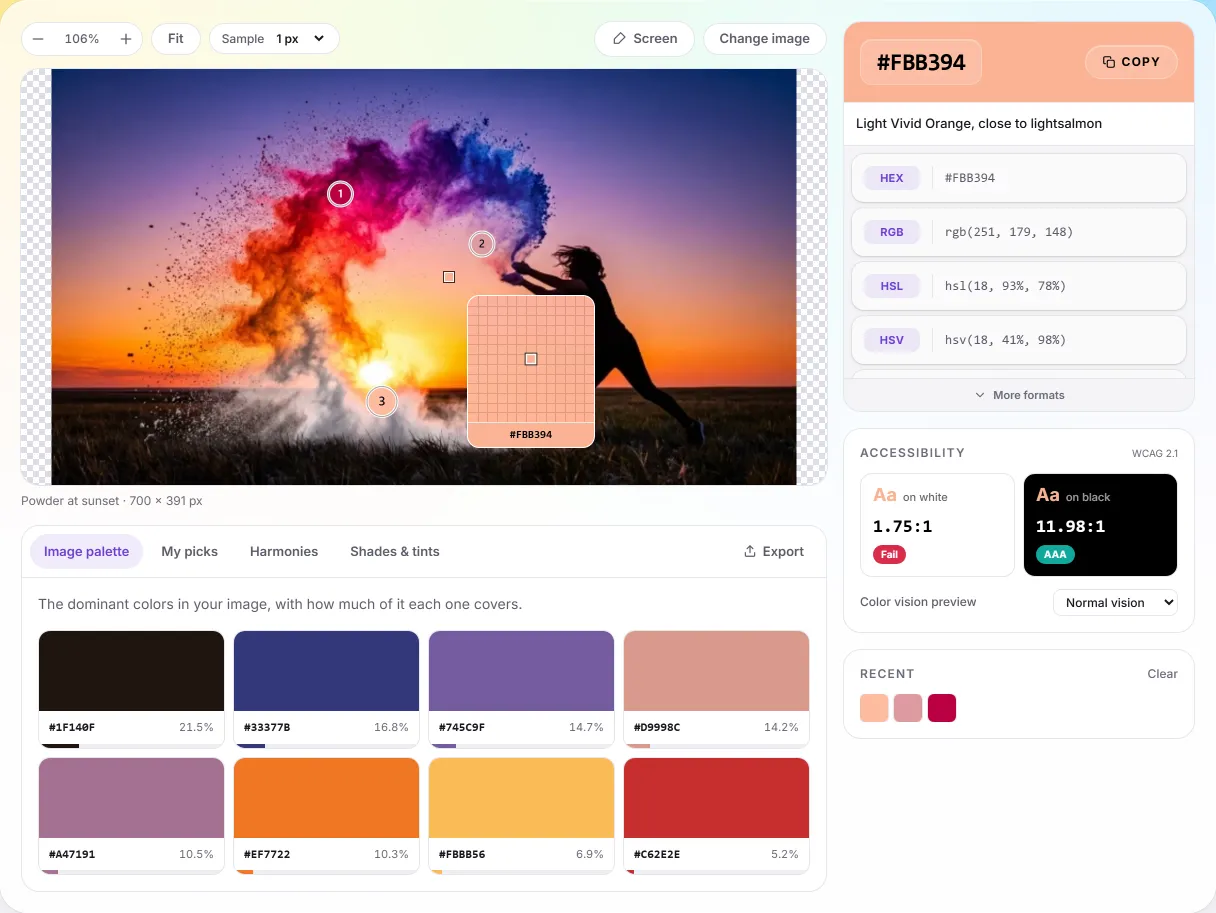
A loupe you can aim with
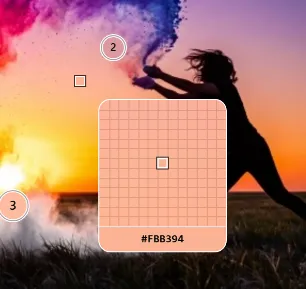
A 13 × 13 magnifier follows your cursor with the pixel grid drawn in, so you land on the pixel you meant. Arrow keys nudge one pixel at a time, Shift moves ten.
Pin as many as you like
Every click drops a numbered pin that stays on the image. Rename them, reorder them, and the whole set exports together in the order you put them in.
Palette with coverage
Eight main colors, grouped the way people see color, each with the share of the image it covers. The work runs in the background, so the page stays responsive.
Nine notations, one click
HEX, RGB, HSL, HSV, CMYK, LAB, LCH, OKLCH and the closest CSS color name, all updating live as you move. Click any row to copy it.
Built for design systems
Generate a 50 to 950 ramp in OKLCH, then take it as a Tailwind v4 theme block, CSS custom properties, SCSS, JSON, a hex list or an SVG sheet.
Accessibility as you go
WCAG contrast against white and black with the grade attached, plus four color-vision deficiencies previewed across every swatch at once.
Already have the color?
The companion color picker works from a hex code instead of an image.
Fine texture
pixel 149, 336
1 px
#877978
3 × 3
#524442
5 × 5
#554745
11 × 11
#584948
1 px → 11 × 11
17.79 ΔE apart
Precision
Precision you can check yourself
Every reading comes from a copy of the image held at its original size. Zooming only changes the view, so a color picked at 12× is byte-for-byte the same as one picked at fit.
The loupe shows a 13 × 13 block of pixels around your cursor with the grid drawn in, so you can see which pixel you will get before you click. When one pixel is not the right answer, for example on compression noise, a gradient or fabric texture, widen the sample and the tool averages the area.
Choosing between one pixel and an average is the main skill, and you can measure it. On a single surface, averaging quickly settles on the true color. Across a hard edge, averaging produces a color that is not in the image at all, so zoom in and pick one pixel instead.
- A 13 × 13 loupe with the pixel grid drawn in
- Sample one pixel, or average 3 × 3, 5 × 5 or 11 × 11
- Arrow keys move one pixel, Shift moves ten
- Wheel zoom anchors on the cursor; hold space to pan
One pixel
a calm area at 72, 17
- HEXWeb + design tools
- #283270
- RGBScreen, CSS
- rgb(40, 50, 112)
- HSLHue / saturation / lightness
- hsl(232, 47%, 30%)
- HSVPhotoshop, Figma pickers
- hsv(232, 64%, 44%)
- CMYKPrint separation
- cmyk(64%, 55%, 0%, 56%)
- LABDevice independent
- lab(23.34% 17 -37.31)
- LCHCylindrical LAB
- lch(23.34% 41 294.5)
- OKLCHModern CSS, perceptual
- oklch(34.57% 0.1071 272.65)
- Closest nameNearest CSS keyword
- ≈ darkslateblue
Output
Nine color codes, and the two you will paste most
Most people want the hex code, or the RGB values for a canvas or a shader, so those two rows sit at the top of the readout. The other seven are for the times when hex is the wrong tool.
HSL and HSV let you ask for “the same color, lighter” without guessing. CMYK is the starting point for print. LAB and LCH are device-independent, so they mean the same color in every app. OKLCH is perceptually uniform: equal steps in OKLCH look equal to the eye, and equal steps in HSL do not. That is why the shade ramps and harmonies here are built in OKLCH.
The ninth row is the closest CSS color name, matched with CIEDE2000 rather than raw RGB distance, so it lands on the name you would have reached for yourself.
- HEX and RGB for the browser, CMYK for print
- LAB, LCH and OKLCH for perceptual work
- Closest CSS color name, matched by CIEDE2000
- Click any row to copy it, or copy all nine at once
Image palette
700 × 391
- #403F8424%
- #1F141022%
- #C08E9114%
- #9266A013%
- #EE6F1B9%
and 3 more, down to 5%
8 colors
clustered in CIE LAB
Palettes
A palette with real weights
This palette starts by shrinking the image to 160 pixels on its longest edge. A median-cut pass splits it into eight groups, then weighted k-means clustering in CIE LAB refines them.
Clustering by perception matters because two blues can be far apart in RGB numbers and still look almost the same. The refinement moves the groups toward the colors you would name yourself.
Each swatch reports the share of sampled pixels it holds, which is the difference between a color that carries an image and one that only shows up in a highlight.
- Eight colors, each with its coverage percentage
- Median cut, then weighted k-means in CIE LAB
- Runs in a Web Worker, so the pointer never stalls
- Export the whole palette, or pin colors by hand
Who reaches for an image color picker
These jobs start the same way: the color is already in a file, and guessing it by eye is not good enough.
Front-end developers
A design arrives as a PNG and the spec never follows. Pull the hex straight from the screenshot, take the 50 to 950 ramp with it, and paste both into your theme file as CSS variables or a Tailwind block.
Product and UI designers
Build a palette from a reference photo, then check it before you commit. The harmonies show what sits well beside it, and the contrast panel tells you whether text on it will pass.
Brand and print work
A logo turns up as a flattened JPEG with no source file. Read the CMYK breakdown and the closest named color, then proof it on paper before anyone orders ink.
Accessibility reviews
A color that looks fine can still be hard to read. Preview every swatch through four types of color blindness at once and find the pairs that blur together before your users do.
Students and hobbyists
Take a photograph you like apart and see what it is made of. The coverage percentages show which colors carry the image and which are only accents.
How to pick a color from an image
Three steps. No account, no watermark and no daily limit.
Bring in your image
Drag a file onto the picker, press Ctrl + V to paste a screenshot, browse your files, or paste the URL of an image on the web. On a phone, browsing usually offers the camera as a source too.
Up to 40 MB, any dimensions, and whatever format your browser can decode.
Hover, then click
The loupe shows the exact pixel grid under your cursor. Scroll to zoom, hold space to pan, and use the arrow keys when a pixel matters. Clicking pins the color and fills the readout beside it.
On a grainy photo, widen the sample to 3 × 3 or 5 × 5 to average the noise away.
Take the colors with you
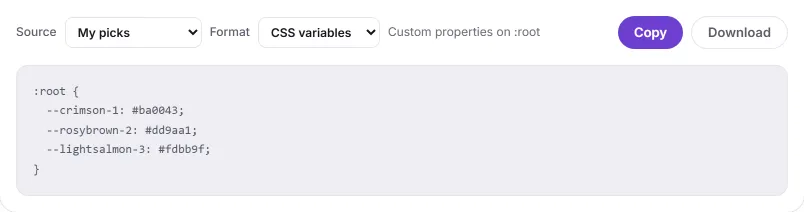
Copy any code with one click. To take several colors at once, open the Export tab and export your pins, the image palette, a harmony or a shade ramp as CSS, Tailwind, SCSS, JSON, a hex list or an SVG sheet.
The link in your address bar carries the current color, so you can share or bookmark it.
Privacy
No upload, and you can check it
There is no upload endpoint on this site. Your browser decodes the file, draws it on a canvas in the same tab, and the tool reads pixels from that canvas. There is no account and no analytics, and nothing records what you open.
You can check this yourself. Open your browser's developer tools, watch the Network panel and pick a dozen colors. No request appears. The project's end-to-end check does the same in a real browser and fails if picking a color ever sends a request.
One exception: if you paste the address of an image instead of the image itself, your browser fetches it from whoever hosts it, and that host sees the request. This site never sees it.
Read the privacy policyImage color picker questions and answers
Answers about how the tool reads a pixel, what happens to your file, and how accurate the result is. The figures come from measurements taken in a real browser.
Still have questions?
If a color comes out wrong, tell me which pixel and what you expected. Those reports are how the accuracy work gets done.
Contact meWhat is an image color picker?
An image color picker is a tool that reads the actual pixel values out of a picture and hands you the color codes for them. You point at a spot in a photo, a screenshot or a logo, and it tells you that pixel is #F5A17D, or rgb(245, 161, 125), or whatever notation you need. It is not a filter and not an editor, and nothing about your image changes. It is a way of getting a color out of an image and into a stylesheet, a design file or a paint order.
How does an image color picker work?
Your browser decodes the image into a grid of pixels, and every pixel holds a red, a green and a blue value between 0 and 255. This tool draws that decoded image onto an HTML canvas at its full original size, then reads back the pixel under your cursor. Those three numbers become every other notation: hex is the same numbers written in base 16, while HSL and OKLCH describe the same color by angle and lightness instead. Zooming changes only what you see. The canvas that gets read is never scaled, so a reading at 10× is the same reading as at fit.
What can I use an image color picker for?
Use it whenever the color you need already exists in an image: measuring is faster than guessing, and people notice when a color is nearly right. If you are rebuilding a layout from a screenshot, matching a brand color out of a PDF somebody emailed you, or pulling a palette from a photograph, the color is already sitting there. You only need it in a form you can paste. A picker also works out the slow parts for you: the color's shades, its contrast against white and black, and whether people with color blindness can still tell it apart from nearby colors.
How do I find the exact color code of an image?
Drop your image onto the picker, hover over the area you want and click. The loupe shows the 13 × 13 pixels under your cursor with the grid drawn in, so you can see which pixel you will get. Clicking drops a numbered pin and fills the panel with nine codes for that pixel; click any code to copy it. For an exact pixel, zoom in and use the arrow keys, which move one pixel at a time.
Which image formats can I use?
Anything your browser can decode, which in practice covers JPEG, PNG, WebP, AVIF, GIF and BMP, plus SVG files that carry an intrinsic width and height. The limit is 40 MB per file; there is no limit on dimensions. You can drag a file in, browse for one, paste a screenshot with Ctrl + V, or paste the URL of an image on the web. Photos taken on a phone arrive the right way up, because EXIF orientation is applied while the image is decoded rather than ignored.
Can I pick several colors from one image?
Yes, in two ways. Every click drops a pin, with no limit on how many, so you can collect colors across an image, rename and reorder them, and export the set in one go. The palette tab describes the whole image: it shrinks the image to 160 pixels on its longest edge, splits it with median cut, then refines the groups with k-means clustering in CIE LAB, a color space built to match human vision. Each of the eight swatches shows the share of the image it covers.
Does this image color picker work on a phone?
Yes. Tap to pick, drag with one finger to pan, and pinch with two to zoom. Browsing for a file usually offers the camera as a source, so you can photograph something and pick from it immediately. A touch screen has no hover: there is no cursor traveling ahead of you, so a tap picks straight away. On small details, pinch in first and then tap, which is the same advice as reaching for the arrow keys on a desktop.
Can I pick a color from anywhere on my screen?
Yes, in Chrome, Edge and other Chromium browsers. The Pick from screen button uses the browser's native EyeDropper API, which can sample any pixel anywhere on your display, including another window, a video frame or a PDF. Firefox and Safari have not shipped that API, so the button does not appear there. On those browsers, take a screenshot and paste it in with Ctrl + V. Picking from a PNG screenshot usually returns the same value you would get from the screen.
Which color codes does it give me?
Nine, live, for every color you pick: HEX, RGB, HSL, HSV, CMYK, LAB, LCH, OKLCH and the closest CSS color name. The name is matched with CIEDE2000 rather than straight RGB distance, so it lands on the name that looks nearest. You will paste HEX and RGB most often. HSL and HSV are easier when you want the same color a little lighter. OKLCH is perceptually uniform, so the shade ramps and harmonies here are built in OKLCH. The companion color picker breaks a single color into 34 codes, adding HWB, CIELUV, OKLab, CIE XYZ and linear sRGB.
How accurate is the image color picker?
The read itself is exact: the tool returns the byte values in the decoded image, with no interpolation and no rounding. The accuracy is lost in the image. In a JPEG saved at quality 95, a pixel in a flat area is 0.37 delta-E from the original (delta-E measures visible color difference; under 1 is invisible). A pixel on an edge is already 6.91 off, and the color is only accurate again about 3 pixels away from a hard edge. Anti-aliasing does similar damage without compression: the rim of one test circle produced 77 colors that appear in neither the shape nor the background. Measured on August 25, 2026 in Chromium 151.0.7922.34.
Can I export the colors I pick?
Yes. Any single value copies with one click. The Export tab exports a whole set at once: your pins, the image palette, the harmonies or a 50 to 950 shade ramp. It offers six formats: CSS custom properties, a Tailwind v4 @theme block, SCSS variables with a map, JSON, a plain list of hex codes, and an SVG swatch sheet with labels. You can copy each one or download it as a file. There is no PNG or Adobe swatch export; the SVG sheet is the closest option.
Are my images uploaded to a server?
No. There is no upload endpoint on this site: your browser opens the file and the tool reads pixels from a canvas in the same tab. There is no account and no analytics. To check, open your browser's Network panel and pick some colors; no request appears. The project's end-to-end check does the same and fails if a request ever leaves the page. The only exception is pasting an image URL, which makes your browser fetch that address from its host.
Is this image color picker free?
Yes. It is free, with no sign-up, no watermark, no daily cap and no paid tier. Every feature, including the palette and all six export formats, is open to everyone. It can stay free because the work happens on your device, so an image costs nothing to process on a server. It works in any modern browser on a desktop, tablet or phone, with nothing to install, and the link in your address bar keeps the last color you picked.
What is the best image color picker?
Check four things: whether it reads your file in your browser or uploads it, whether it gives you more than a hex code (a palette, contrast checks, shade ramps), whether you can widen the sample area for noisy photos, and whether it exports in formats your tools accept. This one does all four. Its limits: the screen eyedropper only works in Chromium browsers, and there is no Adobe swatch or PNG export.
How do I get the HEX code from a screenshot?
Take the screenshot, come back to this page and press Ctrl + V (Cmd + V on a Mac). The image loads at once. Click the pixel you need and copy its HEX code. Screenshots are usually saved as PNG without compression, so the code normally matches what was on your screen.
How do I make a color palette from an image?
Load the image and open the Image palette tab. The tool groups the picture into its eight main colors and shows how much of the image each one covers. Copy any swatch, or export the whole palette as CSS variables, a Tailwind theme, SCSS, JSON, a HEX list or an SVG swatch sheet.
Can I find the name of a color in an image?
Yes. Every color you pick shows the nearest CSS color name, such as “slateblue” or “tomato”, matched by how alike the colors look rather than by raw RGB numbers, plus a plain description like “light muted azure”. The name is the closest match; the HEX code is the exact value.
Can Google tell me the color code of an image?
Not directly. Google's own color picker, shown for searches like “color picker”, lets you choose a color from a spectrum, but it cannot read a pixel from your image. To get the exact code from a photo or screenshot, open it in an image color picker and click the pixel.
Do I need a browser extension to pick colors?
No. This picker runs in any modern browser on desktop or phone, with nothing to install. To pick a color from anywhere on your screen, use the Pick from screen button, which works in Chrome and Edge. In other browsers, take a screenshot and paste it here.